


How to Put the Golden Ratio Into Your kre8or.ai Prompts for Compositions That Look Designed
If you can already get a decent image out of kre8or.ai, the next thing that separates a good-looking image from a designed-looking one is where things sit in the frame. A subject in the dead center with the horizon splitting the picture in half reads as a snapshot. The same subject placed off-center, with the room around it shaped on purpose, reads as a composition.
The golden ratio is one of the most reliable ways to place things deliberately. This article covers the math in plain terms, then turns it into a prompt structure you can reuse and test in kre8or.ai: subject placement, spiral direction, frame proportions and negative space. It stays on position and proportion only. For light and color, the separate guides on this site cover those.
One caution first. Image models read placement language as guidance and not as coordinates, so you will not get pixel-exact results every time. The structure below raises the odds of a balanced frame and gives you a repeatable way to correct the ones that miss.
The Golden Ratio in Two Minutes: What 1.618 Actually Means for Your Frame
Take a line and cut it into a long piece and a short piece. The cut is “golden” when the whole line divided by the long piece equals the long piece divided by the short piece. That value is about 1.618, usually written with the Greek letter phi.
For a composition, the useful version is the percentages. A golden cut sits at roughly 61.8 percent along the line, which leaves the other part at 38.2 percent. On a frame 1920 pixels wide, that puts the vertical lines at about 733 pixels and 1187 pixels from the left edge.
Three pieces of this math matter when you prompt:
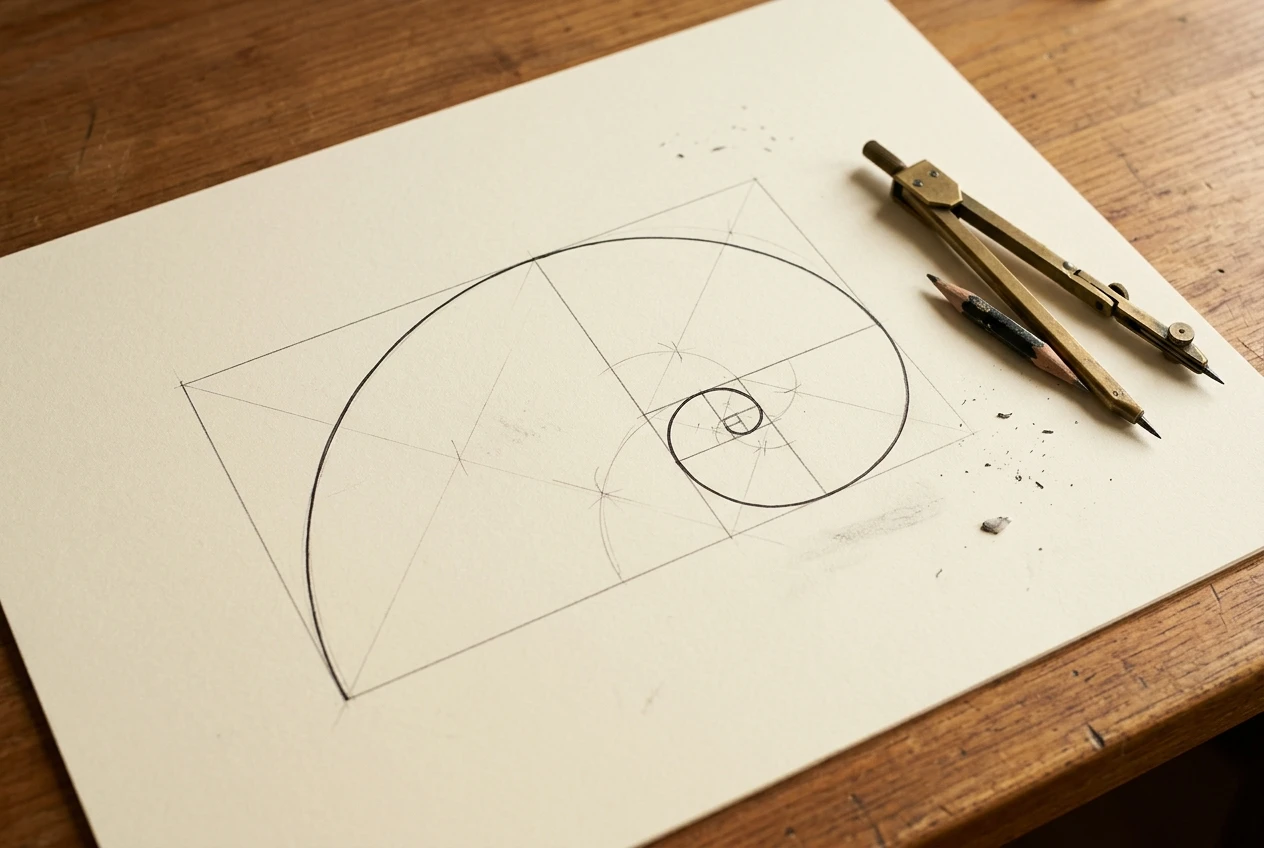
- Phi grid lines. Two vertical lines and two horizontal lines, each at 38.2 and 61.8 percent. They cross at four points, and those crossings are the places to put your focal subject.
- The golden rectangle. A frame whose long side is 1.618 times its short side, such as 1618 by 1000 pixels. Cut a square off one end of a golden rectangle and the rectangle left over has the same 1.618 proportion.
- The golden spiral. Draw a quarter-circle arc inside each square you cut off, and the arcs join into a spiral that tightens toward one corner. The tight end of that spiral is where the eye is meant to settle.
The same number shows up in the Fibonacci sequence. Divide any number in that sequence by the one before it (8 by 5, then 13 by 8) and the result gets closer to 1.618 each time. You do not need the sequence to prompt well, but it explains why artists treat 1.618 as a family of related proportions and not one rigid value. Close enough works, which matters because a model will never hit 61.8 percent exactly.
Why Rule of Thirds Gets You Close and the Golden Ratio Gets You Further
The rule of thirds splits the frame into a three-by-three grid, so its lines sit at 33.3 and 66.7 percent. The golden grid puts them at 38.2 and 61.8 percent. The golden lines are closer to the center, and the gap between the two systems is only about five percent of the frame width.
That small gap changes how the picture feels. A subject on a thirds line sits near the edge and can feel pushed aside. A subject on a golden line has a little more room behind it, so it looks anchored without looking centered. The central band between the golden lines is narrower in visual weight terms than it first appears, which is why a subject there feels held in tension and not parked.
The practical difference for prompting is this. The thirds rule gives you a grid, and a grid tells a model where to put one thing. The golden ratio gives you a grid plus a path: the spiral describes how the eye should travel through the rest of the scene toward that subject. Secondary elements, such as a path, a shoreline or a row of lamps, can be placed to follow that path, and that is what makes a frame look arranged and not merely off-center.
Thirds is a fine default, and if your images already use it, you are ahead of random. The golden ratio is the next adjustment, and it costs you only a few extra words per prompt.
The Prompt Structure That Tells kre8or.ai Where to Put Things
Most weak compositions come from prompts that describe what is in the scene and say nothing about where it sits. The model fills in the placement itself, and it tends to default to a centered subject. This structure gives each placement decision its own slot, so none are left to chance.
Write the prompt in this order:
- Subject. What the picture is about, in a few concrete words.
- Subject position. Where it sits, using the golden intersections.
- Secondary element. One supporting object, placed on the opposite side or along the spiral.
- Composition tag. The spiral, grid or triangle wording (covered in the next section).
- Negative space. Which part of the frame stays empty, and how much.
- Setting and style. Everything else: location, medium, mood.
Here is the skeleton with each slot filled in generically:
A red fox standing on a snowy ridge, placed at the left golden-ratio intersection of the frame, a leafless birch tree at the lower right, golden spiral composition tightening toward the fox, wide empty snowfield filling the right 60 percent of the frame, early morning, soft painterly style
Some wording habits make this work better:

- Name the side. “Left golden-ratio intersection” gives the model a direction. “Golden ratio” alone gives it a phrase with no location.
- Say upper or lower. Add “upper left” or “lower left” so the subject lands on one of the four crossings and not just somewhere along the left side.
- Give negative space a number. “The right 60 percent” is clearer than “lots of empty space.” A figure close to 62 percent echoes the ratio, and 60 is easier for a model to read.
- Keep the subject description short. A long subject description competes with the placement words for the model’s attention. Put detail in the setting and style slot.
If you want a broader foundation for building prompts before you add placement, the guide to graphic prompts that turn any idea into art on kre8or.ai covers the basics of structuring one.
Spiral, Grid, or Triangle: Matching the Composition Tag to Your Scene
The golden ratio comes in three working forms. They suit different scenes, and picking the wrong one is a common reason a frame looks forced.

The golden spiral
Use it when the scene has a clear single focal point and a way for the eye to approach it: a winding road, a curve of coastline, a staircase, a cluster of petals, a figure with a trailing cloak. The spiral wants curved or flowing elements that can follow its path.
Spiral direction decides which corner the tight end sits in. Describe it with plain words such as “spiral tightening toward the lower left” or “spiral winding clockwise toward the subject on the right.” If you do not specify, you leave the direction to the model, and it may point the flow away from your subject. Generate a couple of versions with opposite directions and keep the one where the flow leads inward. If a result has the right layout but faces the wrong way, flipping the image horizontally in any editor is a quick repair.
The phi grid
Use it for scenes with several objects, such as a street, a table setting, a cityscape or a landscape with a horizon. The grid is about stationing things: the horizon on the upper or lower golden line, the main subject on a crossing, a secondary object on another crossing.
For horizons especially, the grid helps. “Horizon along the lower golden line” gives a big sky with a grounded foreground. “Horizon along the upper golden line” gives a foreground-heavy frame. Either is more interesting than a horizon at 50 percent.
The golden triangle
This one divides the frame with a diagonal from one corner to the opposite corner, then draws a line from a third corner down to meet the diagonal at a right angle. The frame ends up in three triangles. Use it for dynamic, diagonal scenes: action poses, a runner, a ship heeling in a swell, a character leaning into wind.
Describe it as “diagonal golden triangle composition, subject along the main diagonal.” Elements that run along or across that diagonal give the scene movement that spiral and grid layouts tend to calm down.
A simple way to choose: if the scene is calm and has one star, try the spiral. If it has several parts to arrange, use the grid. If it needs energy, use the triangle.
Set the Canvas First: Choosing Proportions That Already Lean Golden
Placement words only go so far if the canvas itself fights the ratio. A square frame has no golden proportion at all. A very wide frame stretches the grid until the lines sit near the edges. Choosing the canvas before you write the prompt puts you most of the way there.
The target is a long side about 1.6 times the short side. These standard ratios sit close to it:
Ratio Long side divided by short side Fit 16:10 1.6 Very close, good for landscape scenes 8:5 1.6 Same as 16:10 5:3 1.667 Close, slightly wider 3:2 1.5 A little narrow, still works well 16:9 1.78 Wider than golden, suits cinematic scenes
For portrait frames, turn the same numbers on end: 10:16, 5:8 and 2:3 all lean golden. For a character portrait or a tall subject such as a tower or a tree, a tall frame in one of those ratios usually gives the spiral room to work.
I do not know which exact ratios the canvas settings in kre8or.ai offer at any given time, so check the options in the interface and choose the one closest to 1.6. If the closest option is wider than you want, generate at that size and crop to a true golden rectangle afterward. A 1920 by 1200 frame, for example, is exactly 1.6, and cropping a wider image down to those dimensions takes seconds in any image editor.
One more reason to settle proportions first: the placement words in your prompt refer to the frame as it will be generated. If you change the canvas later, the intersections move, and a subject placed carefully for a wide frame will land in a different spot on a tall one.
Same Scene, Three Prompts: A Before and After You Can Copy
The best way to judge the ratio is to hold everything else constant and change only the placement language. Here is one scene, a lighthouse at dusk, written three ways. The style and mood words are identical in all three, and the canvas should be the same for every run (16:10 is a good choice).
Prompt A: no placement language
A lighthouse on a rocky coast at dusk, calm sea, a small fishing boat on the water, purple and orange sky, detailed digital painting
Prompt B: rule of thirds
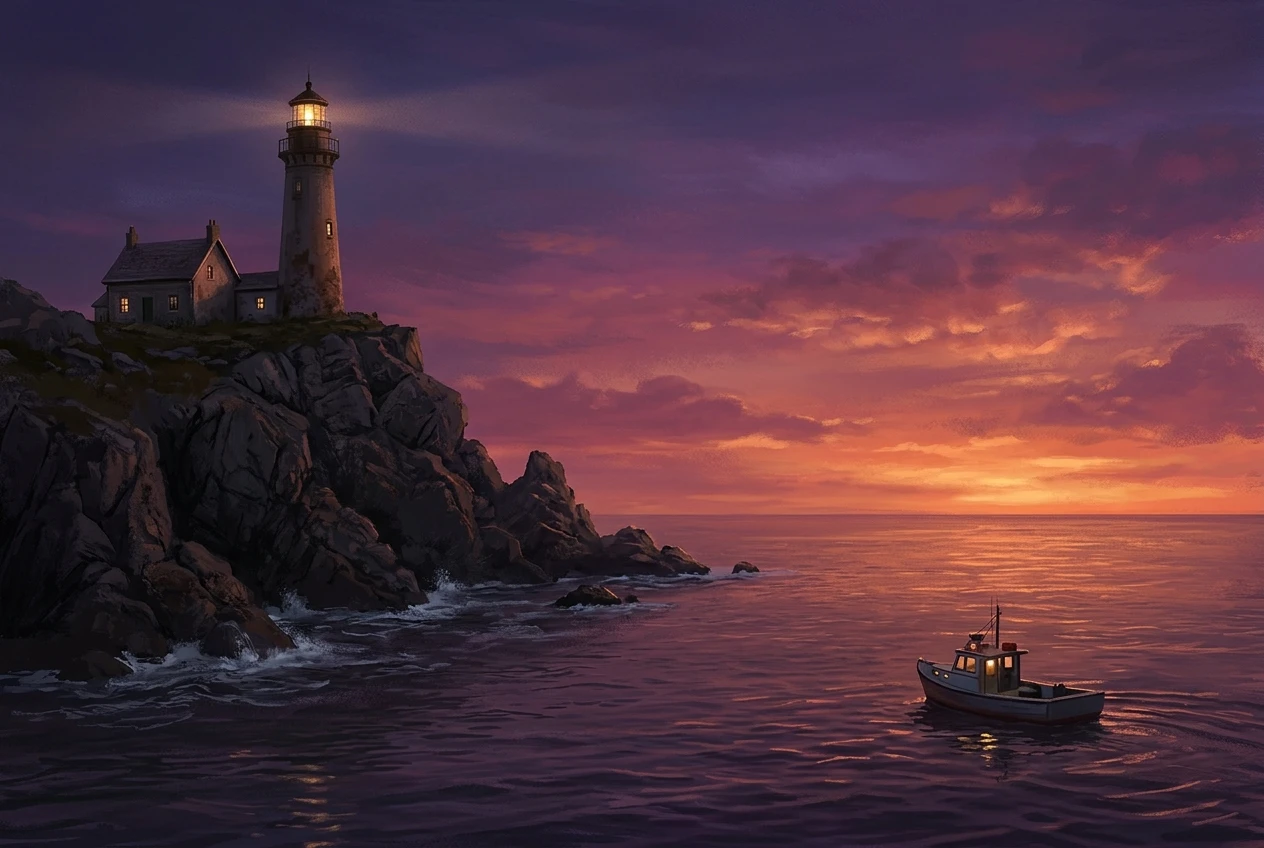
A lighthouse on a rocky coast at dusk, positioned on the left third line, a small fishing boat on the water at the right third, horizon on the lower third line, calm sea, purple and orange sky, detailed digital painting
Prompt C: golden ratio structure
A lighthouse on a rocky headland at dusk, placed at the upper left golden-ratio intersection of the frame, a small fishing boat at the lower right, golden spiral composition tightening toward the lighthouse, horizon along the lower golden line, open calm sea and sky filling the right 60 percent of the frame, purple and orange sky, detailed digital painting
Generate each one several times, since single runs vary. Then compare the sets with these questions:
- Where does the lighthouse sit? In A it will often land near the middle. In B and C, check whether it moved off-center, and by how much.
- Where is the horizon? Look for a line near the middle in A and a line below center in B and C.
- Does the eye have a route? In C, trace a path from the boat through the water toward the lighthouse. If the shoreline, wave pattern or light beam supports that path, the spiral instruction is working.
- Is there empty room, and does it feel intentional? The open sea in C is meant to balance the heavy lighthouse. If the empty space looks like leftover blank canvas, the placement landed but the balance did not, and the fixes in the next section apply.
I am describing what to look for and not promising a particular result. Treat the comparison as a test of your own prompts. Differences between B and C are subtle by design, and the clearest contrast will be between A and either of the others. If you cannot tell B from C, that is useful information: it means the thirds structure is enough for that scene, and you can reserve the spiral for scenes that need more flow.
To check your results objectively, open each image in an editor and draw guide lines at 38.2 and 61.8 percent of the width and height. On a 1920 by 1200 image, the vertical guides go at 733 and 1187 pixels, and the horizontal guides at 458 and 742 pixels. See whether the lighthouse sits near a crossing. Being within a few percent of a crossing is a good result.
When the Ratio Fights Back: Fixing Subjects That Land in the Wrong Place
Some generations will ignore the placement, and some will follow it in an unwanted way. These are the common problems and the adjustments for each.
The subject is centered anyway. The model defaulted to its habit. Move the placement phrase closer to the front of the prompt, right after the subject, and shorten the subject description so the position words carry more weight. Also try a different wording, such as “off-center to the left, about two fifths of the way across the frame.” Describing the position in fractions sometimes lands better than the phrase “golden ratio.”
The subject is on the correct side but too small. Placement can shrink a subject because the model leaves room for the negative space you asked for. Add a size phrase: “the lighthouse fills about a third of the frame height.” Or reduce the empty-space figure from 60 percent to 50 percent.
A visible spiral or grid is drawn into the picture. Composition words can be read as a request for the diagram itself, and some models draw it. Rephrase to describe the effect and not the name: “the eye is led in a curve toward the lighthouse” in place of “golden spiral.” You can also add terms such as “overlay lines, grid lines, diagram, text” to the negative prompt. The guide on how to use negative prompts to clean up your kre8or.ai images explains how to word that field.
The spiral points away from the subject. The flow runs toward an empty corner. State the direction explicitly, or flip the finished image horizontally so the flow faces inward. Check that any text or asymmetric detail still reads correctly after flipping.
The negative space looks accidental. Empty space works when it has a purpose, such as a sky, a wall or a snowfield with subtle texture or a gradient. If it reads as blank, give it content that stays quiet: “soft gradient sky with thin clouds” instead of “empty.” The space should be calm, not absent.
The layout is right but the frame proportion is off. Crop. A slight crop to a golden rectangle can bring a nearly correct composition into line. Keep the subject near a crossing and trim from the side with the most empty space.
Treat a miss as a data point. If the same fix works across several scenes, add it to your standard template. Over time you end up with a short personal prompt skeleton that reliably produces balanced frames, which is the actual goal: a structure you can reuse, not a one-off lucky image.
Try It on a Scene You Already Have
Take one scene you have already made, rewrite the prompt using the golden ratio structure from this article, and generate both versions side by side in kre8or.ai to see the difference yourself.